
Adding a CITATION.cff File
Last updated on 2026-09-22 | Edit this page
Overview
Questions
- What is a CITATION.cff file and why does it matter?
- How does GitHub use CITATION.cff to generate ready-made citations?
- What minimal metadata should researchers include?
Objectives
- Explain the role of
CITATION.cffin software citation. - Create and customize a
CITATION.cfffile in a GitHub repository. - Describe how the file connects to later steps like releases and DOIs.
- Coach a researcher through a
CITATION.cffand recognize when authorship is a referral, not a metadata fix.
A catalog record for your software
When someone wants to cite a book, nobody emails the author to ask how. The catalog record answers it. Software has lacked that record, so people improvise: they cite a URL, or the paper the code appeared in, or nothing. A CITATION.cff file is the catalog record for a repository, a short, structured metadata file that specifies exactly who to credit and how. Once it exists, GitHub grows a “Cite this repository” button, and the guesswork ends.
Every librarian has shown a student the “Cite” button on a database record and watched the relief. This is the same button, on code, and the researcher controls what it says. Without the file, everyone who wants to cite the software writes their own version of the reference, and the credit scatters across formats no index can reconcile.
A CITATION.cff file is the simplest, most direct way to
make your software citable. It provides structured citation metadata
that:
- tells others how to reference your work
- allows GitHub to display a “Cite this repository”
button
- supports good scholarly practice and FAIR4RS principles
You can create this file before releases or
DOIs.
If you later add a DOI or version tag, you can update the file at any
time.
What belongs in a CITATION.cff file?
A minimal file includes:
-
title of the software
-
authors (ORCID recommended if available)
-
version (optional at this stage)
- message with basic instructions
As your project grows, you can add:
- release versions
- DOIs from Zenodo or another service
- keywords
- abstract
- repository URLs
Learners do not need to know the entire schema.
The point is to start small and publish useful metadata early.
Why the CFF format works well
- human-readable
- YAML-based
- validated automatically by GitHub
- supported by tools including Zotero, Zenodo, and reference managers
If you have ever edited a repository record, filled in a Dublin Core field, or touched frontmatter on a library website, you have done harder metadata work than this. The format is new to researchers; the thinking is native to library work. And the file compounds downstream: Zenodo reads it, Zotero reads it, and the citation travels with every clone and fork of the code, which a citation buried in a paper’s methods section never does.
How to Create a CITATION.cff File
You will do this entirely in GitHub’s web interface, in your fork. No
terminal required. GitHub has this built in: name a new file
CITATION.cff and it hands you a starter template to
edit.
Create the file on GitHub
In your fork of software-demo:
- Click Add file → Create new file.
- Name the file exactly
CITATION.cff(it must live in the repository root, and the name is case-sensitive). As soon as you do, GitHub recognizes it and shows a banner with an Insert example button. - Click Insert example. GitHub drops a valid, ready-to-edit template into the editor.
- Edit the placeholders: replace
YOUR_NAME_HERE, add real ORCIDs, and set thetitleandurlto match your repository. -
Delete the
doiline (you do not have a DOI yet, you will add it in the next episode). Deleteversionanddate-releasedtoo if you have not made a release; otherwise set them to match. - Click Commit changes… and commit to your
mainbranch.
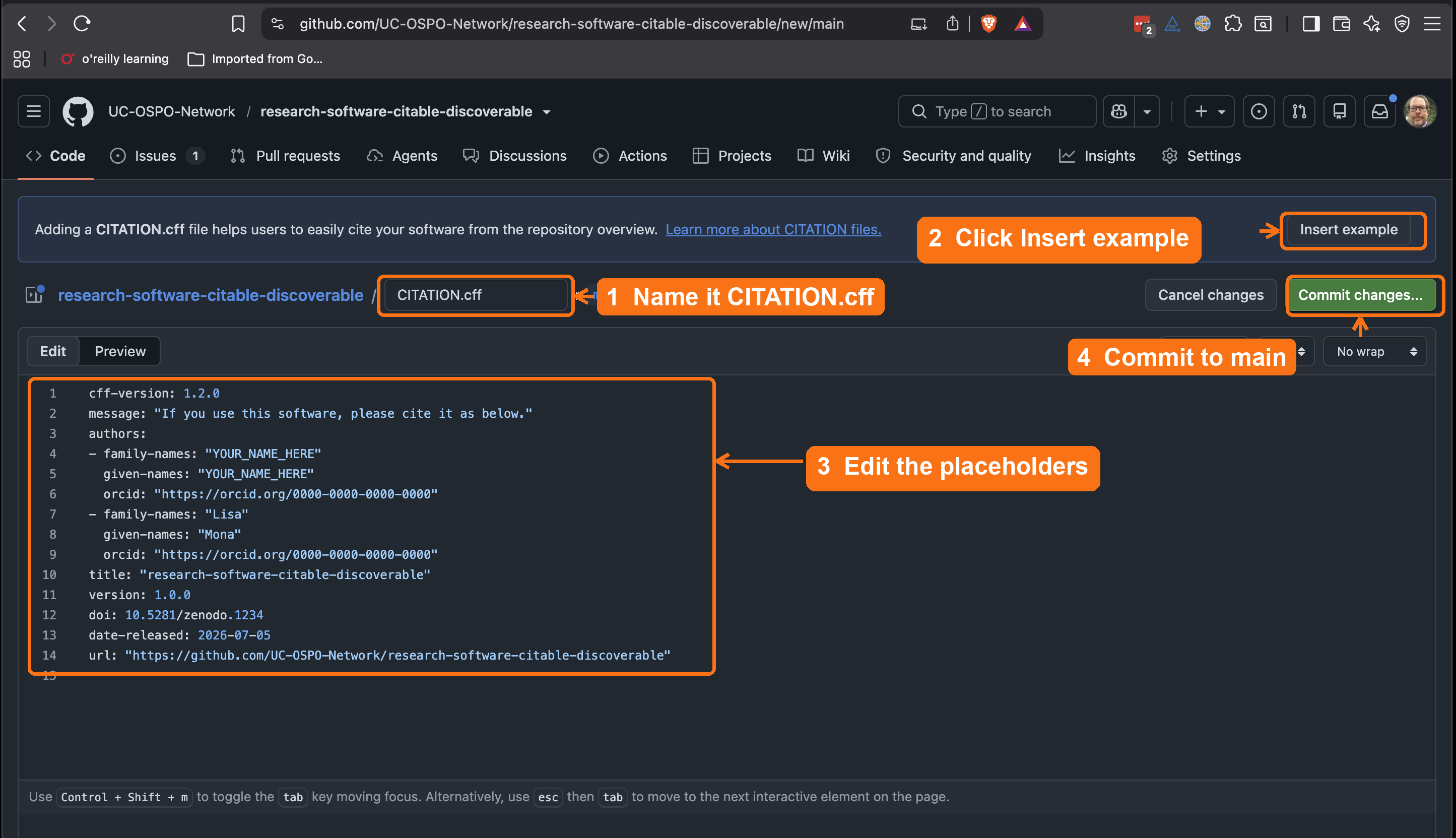
CITATION.cff, click
Insert example to drop in GitHub’s template, edit the
placeholder names and ORCIDs, then commit to main.The inserted template looks like this before you edit it:
YAML
cff-version: 1.2.0
message: "If you use this software, please cite it as below."
authors:
  - family-names: "YOUR_NAME_HERE"
    given-names: "YOUR_NAME_HERE"
    orcid: "https://orcid.org/0000-0000-0000-0000"
title: "your-repository-name"
version: 1.0.0
doi: 10.5281/zenodo.1234
date-released: 2026-07-05
url: "https://github.com/YOUR-USERNAME/your-repository-name"Prefer a guided form? Use cffinit
cffinit
is a web wizard that walks you field by field and validates as you type.
It is worth using when your metadata is more involved: many authors, a
preferred-citation for an associated paper, keywords, or a
license you want recorded precisely. Fill out the form, copy the
generated file, and paste it into the same CITATION.cff you
create on GitHub. More on the format: https://citation-file-format.github.io/.
A finished file looks like this:
YAML
cff-version: 1.2.0
title: "Biodiversity Analysis Toolkit"
message: "If you use this software, please cite it as below."
authors:
  - family-names: "Dennis"
    given-names: "Tim"
    orcid: "https://orcid.org/0000-0001-6632-3812"
  - family-names: "Phan"
    given-names: "Leigh"
    orcid: "https://orcid.org/0000-0002-8605-1444"
  - family-names: "Otsuji"
    given-names: "Reid"
    orcid: "https://orcid.org/0000-0002-1842-0295"
  - family-names: "Padilla"
    given-names: "Karla"
version: "0.1.0"
date-released: 2026-02-01
url: "https://github.com/UC-OSPO-Network/software-demo"
repository-code: "https://github.com/UC-OSPO-Network/software-demo"
There is deliberately no doi field yet:
you do not have one until you mint it in the next episode. Once you
create a release and Zenodo assigns a DOI, you will come back and add a
doi: line. If your project has no tagged version either,
you can omit version and date-released for now
and add them at release time.
Once you commit it to the default branch, GitHub adds a “Cite this repository” button automatically.
If your software does not yet have version tags, you may omit the
version field until Episode 4 when you create releases.
Check your work
Compare your fork against the 03-add-citation
reference branch on the demo
repository. It shows the target state after this episode: a
CITATION.cff in the root and a “Cite this repository”
button in the sidebar.
Linking to a published paper
Many researchers want users to cite a journal article
alongside or instead of the raw software repository.
The preferred-citation field handles this: it tells GitHub,
Zotero, and other tools which reference to show first.
YAML
cff-version: 1.2.0
message: "If you use this software, please cite the paper below."
authors:
  - family-names: "Dennis"
    given-names: "Tim"
    orcid: "https://orcid.org/0000-0002-1234-5678"
title: "Biodiversity Analysis Toolkit"
version: 0.1.0
date-released: 2025-01-15
url: "https://github.com/UC-OSPO-Network/software-demo"
preferred-citation:
  type: article
  title: "Biodiversity Analysis at Scale: Methods and Software"
  authors:
    - family-names: "Dennis"
      given-names: "Tim"
  journal: "Journal of Open Source Software"
  year: 2025
  doi: "10.21105/joss.00000"
Without preferred-citation, GitHub shows the software
repository citation by default. Adding it ensures that anyone clicking
“Cite this repository” gets your paper’s citation instead, which is
usually what you want for impact tracking.
No paper yet? Skip it.
Leave out preferred-citation if you don’t have a
published article. You can add it later. The rest of the file works fine
without it.
Challenge
Predict: what will GitHub do?
You’ve created CITATION.cff and you’re about to commit
it to the default branch. Before you do, predict: what changes on the
repository’s GitHub page?
GitHub parses the file and adds a “Cite this repository” button to the sidebar, offering ready-made citations (APA, BibTeX, and more) generated from your metadata. No DOI is required for this to appear.
Step 3: Commit and refresh
After you commit the file, GitHub:
- parses and validates it
- displays a “Cite this repository” panel
- provides download options (BibTeX, EndNote, CFF, APA)
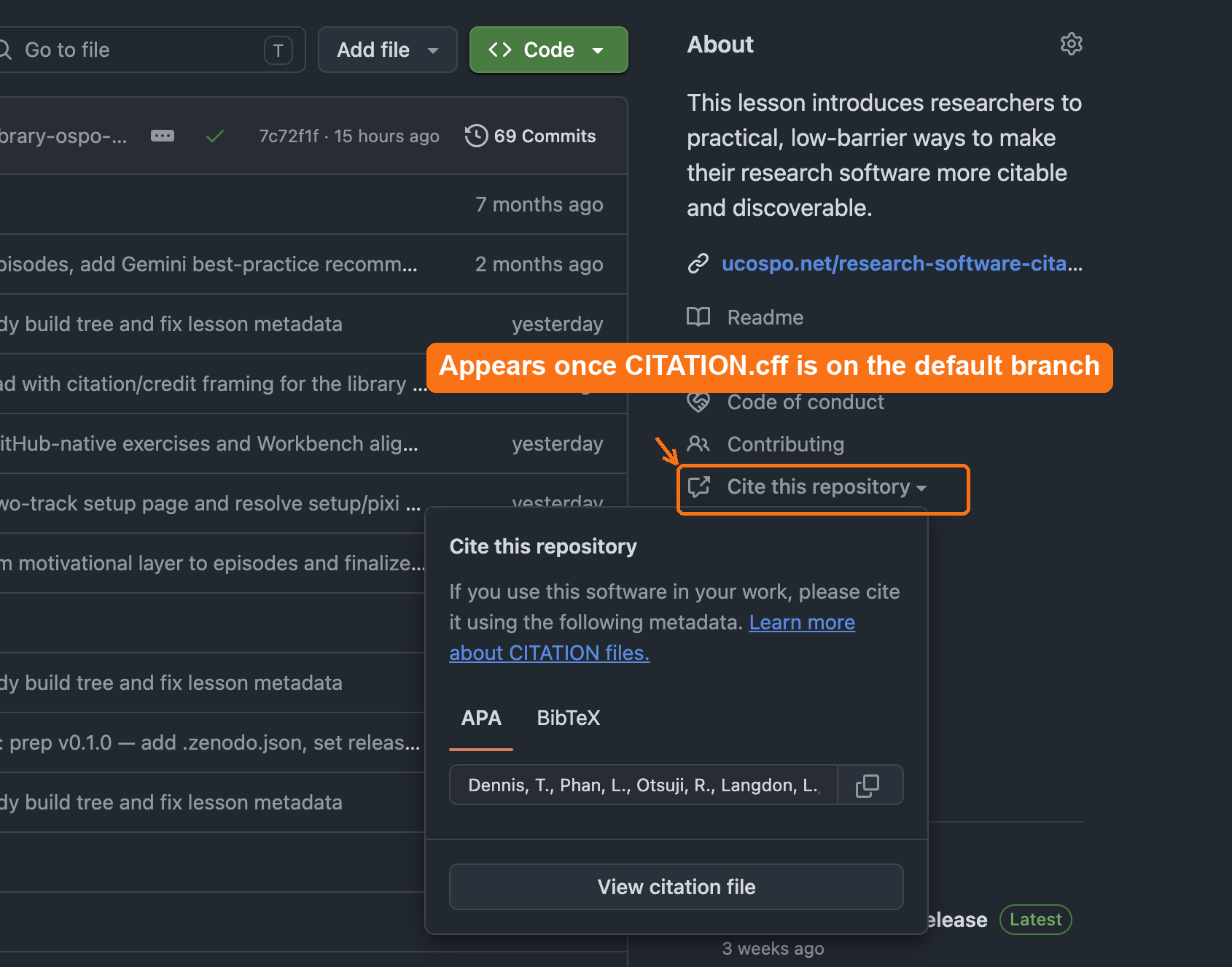
CITATION.cff is on the default
branch, GitHub adds a Cite this repository link to the
About sidebar that opens ready-made APA and BibTeX citations.This feature works even without a DOI.
Text-only check: after you commit
CITATION.cff, refresh the repository page. The About
sidebar should now show a “Cite this repository”
link.
Check, in order:
-
Filename and location — is it named exactly
CITATION.cff(case-sensitive) and in the repository root, not a subfolder? - Branch — is it committed to the default branch? GitHub only reads the file from the default branch.
- Valid YAML — does the file parse? A stray indentation or missing quote stops GitHub from rendering the panel. cffinit validates for you.
This three-question triage is exactly the kind of quick diagnostic you will run in a consultation.
Supporting others
In a consultation you rarely edit a researcher’s files yourself. Your job is to make the workflow easy for them to own:
- Point them to cffinit (https://citation-file-format.github.io/cffinit/) instead of hand-editing YAML. It validates as they go and prevents most formatting errors.
- Show the payoff first: the “Cite this repository” panel on a repo that already has the file. People adopt what they can see.
- Know the boundary. If authorship or author order is contested, that is a credit negotiation between collaborators, not a metadata fix. Surface it, don’t arbitrate it.
Exercise 1: Identify missing metadata
Look at your repository (or the example repository provided with the lesson).
Reflect:
- What metadata is easy to add today?
- What might require input from collaborators?
- What do you prefer to add later?
Share one observation.
Typical missing pieces include:
- ORCID IDs
- complete contributor list
- description or abstract
- license information
- DOI (added later if desired)
Exercise 2: Add a CITATION.cff file
Steps:
- Create CITATION.cff.
- Add at least: title, author(s), and message.
- Commit and refresh to see GitHub’s citation panel.
Challenge: Is a citation file enough?
You now have a CITATION.cff and GitHub’s “Cite this
repository” button. That is a real and necessary first step: anyone can
cite the software in a consistent form, and the metadata is
machine-readable. But before the next episode, think about what this
citation still does not guarantee. Consider three
questions:
- If someone cites your repository today and you change the code tomorrow, does their citation still point to the code they actually used?
- If the repository is renamed, the account is deleted, or GitHub itself goes away, does the citation still resolve to anything?
- Can a reader retrieve the exact version of the software that produced a specific paper’s results?
What is missing, and what would fix it?
A CITATION.cff makes software citable in
principle, but the citation is not yet durable or
version-specific:
- It points at a moving target, the default branch, so the code being “cited” keeps changing.
- It depends on the repository staying at that URL. A GitHub URL is not a persistent identifier; it rots.
- It does not pin the exact snapshot behind a published result, so a reader cannot reliably reproduce or verify what was used.
The fix is a tagged release archived to a repository like
Zenodo, which mints a DOI: a persistent
identifier for an immutable snapshot. The DOI is what connects
the software into the scholarly credit and indexing apparatus (DataCite,
ORCID, library catalogs) and lets a citation resolve to one exact
version, permanently. Put another way: CITATION.cff says
how to cite the software; a release and DOI give the citation
something durable to point at. That is the next episode.
One more gap CITATION.cff alone doesn’t close: a
human has to find it. Not everyone who wants to cite your
software will know to look for a machine-readable file or click “Cite
this repository.” Add a plain, human-readable citation to your README
too, in whatever format your field expects, alongside the CFF file
rather than instead of it (see peerj.com/articles/cs-86
for why both matter).
- A CITATION.cff file is the foundation of software citation.
- It can be added before releases, DOIs, or version tags.
- GitHub displays machine-readable citations automatically when this file is present.
- Start simple and expand over time as your project develops.
- A citation file is necessary but not sufficient: a release and DOI make the citation durable and tied to an exact version. That is the next step.