
Making Your Software Citable
Last updated on 2026-09-22 | Edit this page
Overview
Questions
- What makes software citable?
- How do releases and DOIs strengthen software citation?
- How do I create a release and, optionally, mint a DOI?
Objectives
- Describe why software citation matters in research.
- Create a versioned release in GitHub.
- Explain when and why to mint a DOI with Zenodo.
- Supporting others: advise which DOI, version or concept, belongs in a given citation.
Why a repository is not an archive
A GitHub repository is a workshop, not an archive. The code changes daily, the URL can break, and “the version we used” means nothing without a marker. This episode adds the two things scholarly infrastructure needs to take software seriously: a release, which freezes a named version, and a Zenodo DOI, which gives that frozen version a persistent identifier and a preservation copy outside GitHub entirely. After this step, the software can be cited like an article, and the citation still resolves in 20 years.
Software is a research product.
Like articles and datasets, it should be cited so
others can acknowledge your work, find the exact version you used, and
understand how your software contributed to their results.
Your software becomes citable as soon as it includes:
-
Structured citation metadata, such as a
CITATION.cfffile. -
A public location where the code is
available.
- A stable version someone can reference.
A DOI is optional but valuable. It strengthens citability by giving each version a persistent identifier.
So far in this lesson, you have:
- shared a public repository
- added a license
- added a
CITATION.cfffile
In this episode, you will create a GitHub release and learn how DOIs fit into software citation workflows.
What Makes Software Citable?
Software is citable when:
- it includes authorship and version information
- the referenced version is stable
- others can access the code
A DOI enhances these qualities, but does not define them.
Why add a DOI?
A DOI is helpful for:
- increasing visibility and discoverability
- long-term persistence
- citing exact versions
- meeting journal and funder expectations
But the core citability comes from your metadata and release process.
A useful way to hold the difference: a DOI is a permanent address, a URL is a sticky note. The GitHub URL points at wherever the code happens to live today. Rename the repo, change the username, or watch the platform fold (Gitorious did, Google Code did) and the note falls off. The DOI is registered infrastructure, the same DataCite plumbing behind dataset DOIs, and it resolves no matter where the object moves.
Create a Release in GitHub
A release captures a specific version of your software.
It is the snapshot that others can cite.
Steps
- Open your GitHub repository.
- Select Releases → Draft a new release.
- Create a tag such as
v0.1.0. - Add release notes summarizing changes.
- Publish the release.
Creating a release does not change your CITATION.cff
file. GitHub builds the “Cite this repository” panel from the file on
your default branch. After you publish a release, update the
version and date-released fields in
CITATION.cff if you want the citation to point at that
specific release.
Semantic Versioning (SemVer)
You might wonder why we chose v0.1.0. This follows
Semantic Versioning
(MAJOR.MINOR.PATCH):
-
MAJOR version when you make incompatible API
changes (e.g.,
1.0.0) -
MINOR version when you add functionality in a
backward compatible manner (e.g.,
0.1.0->0.2.0) -
PATCH version when you make backward-compatible bug
fixes (e.g.,
0.1.1)
Starting with 0.x.x indicates your software is in
initial development and the API is not yet stable.
If a project doesn’t use semantic versioning at all, the README should instruct users to cite the commit hash instead of a version number, so the exact state of the code that produced a result can still be pinned down (Katz et al., 2019: https://arxiv.org/abs/1905.08674).
Challenge 1: What belongs in a release?
Take one minute to reflect:
- What information would help a future you understand what changed in this version?
Useful release notes include:
- what changed
- what was added or removed
- what bugs were fixed
- what might break for users
- anything important about reproducibility
Clear release notes help both people and tools interpret your software’s evolution.
Minting a DOI with Zenodo Sandbox
To practice minting a DOI without polluting the permanent scholarly record, we will use Zenodo Sandbox. It works exactly like the real Zenodo but is for testing.
Practice on the sandbox, not real Zenodo
Real Zenodo records are permanent: a published DOI cannot be deleted. Use https://sandbox.zenodo.org for this exercise, and switch to real Zenodo only when you are depositing software you actually want on the scholarly record.
Predict: what happens when you publish?
Your GitHub repository is connected to Zenodo and you publish a new release. Predict: what does Zenodo do, with no further action from you?
Zenodo detects the release, downloads and archives a snapshot of the repository at that tag, and mints a permanent DOI for it. The archived version no longer depends on GitHub staying online.
The Complete 6-Step Workflow
Step 1: Log in to Zenodo with GitHub
- Visit https://sandbox.zenodo.org
- Click “Log in with GitHub”
- Authorize Zenodo to access your repositories
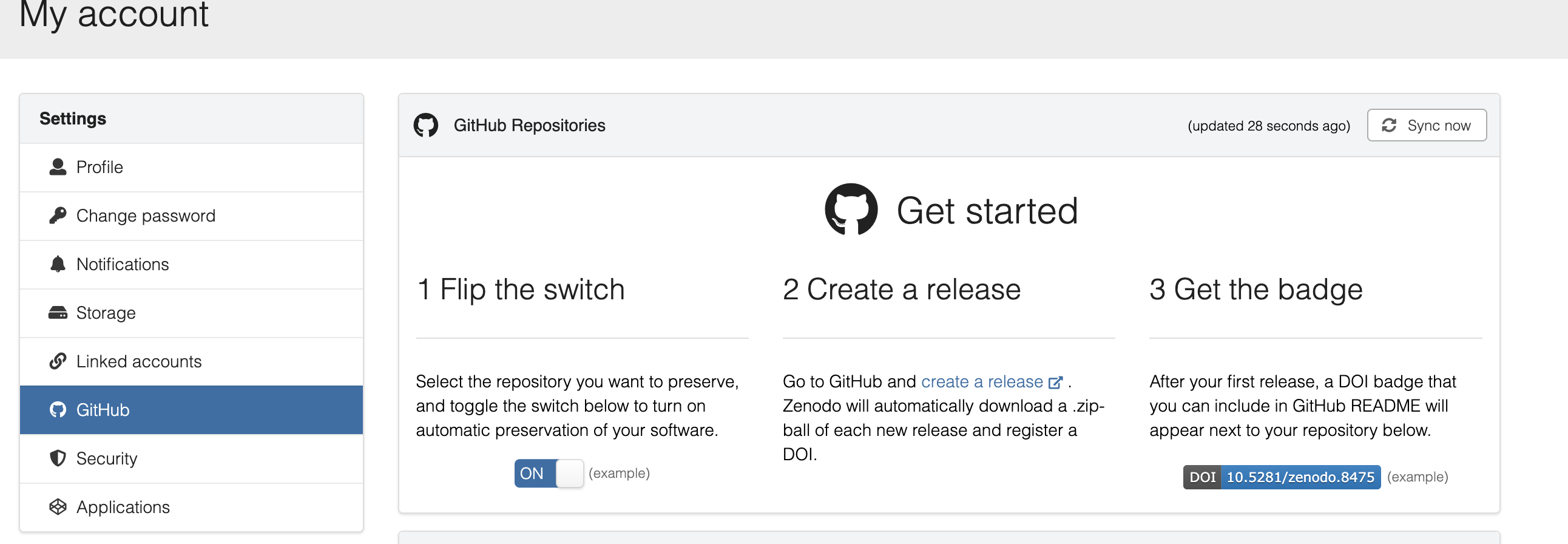
Step 2: Enable your repository (toggle ON)
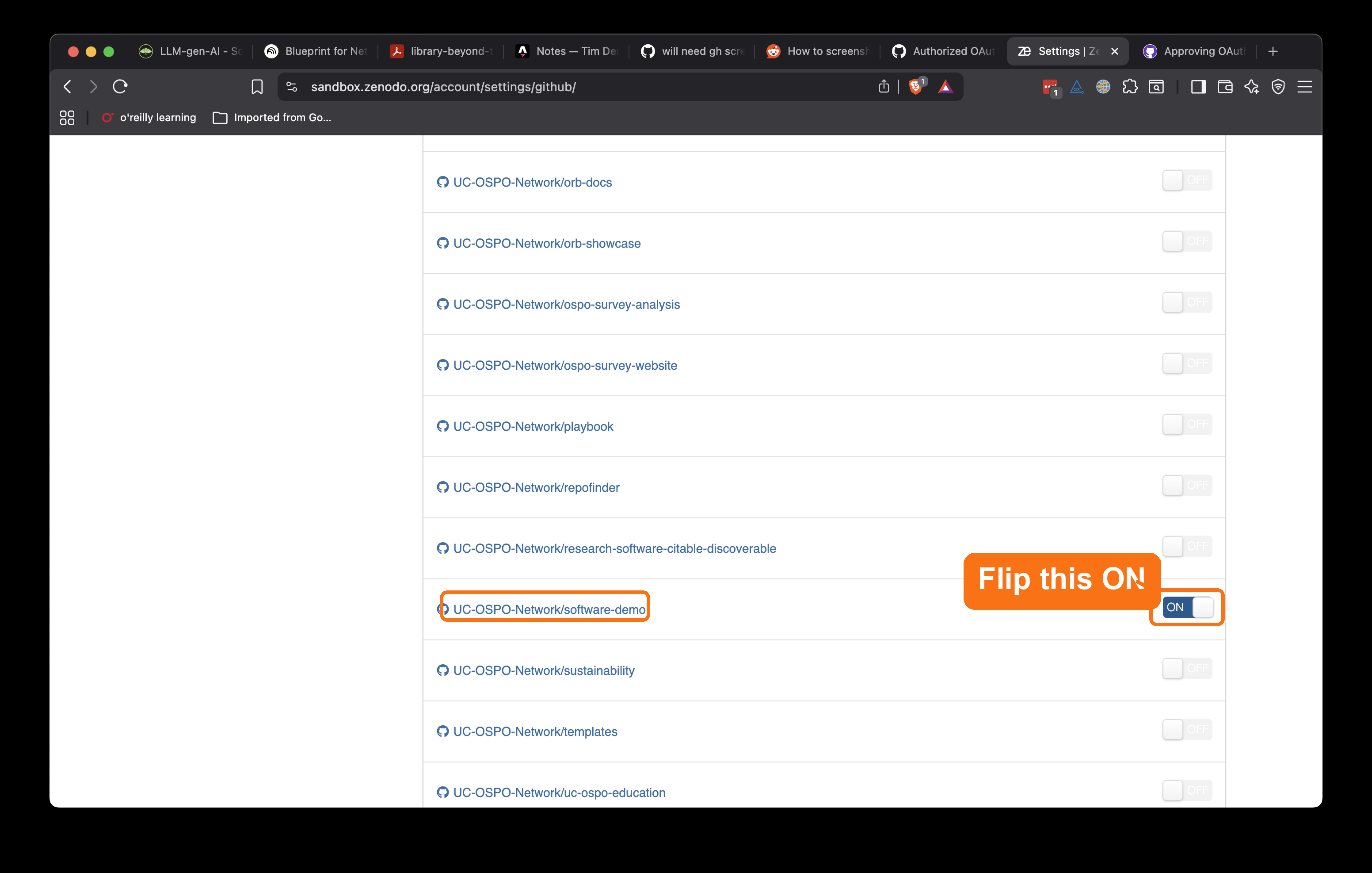
- Go to Settings → GitHub in Zenodo Sandbox
- Find your repository in the list
- Toggle the switch to ON (green)
- This tells Zenodo to watch for new releases
Step 3: Create GitHub Release (tag v0.1.0)
- Go to your GitHub repository
- Click Releases → Draft a new release
- Create a tag:
v0.1.0 - Add release notes describing what’s in this version
- Click Publish release
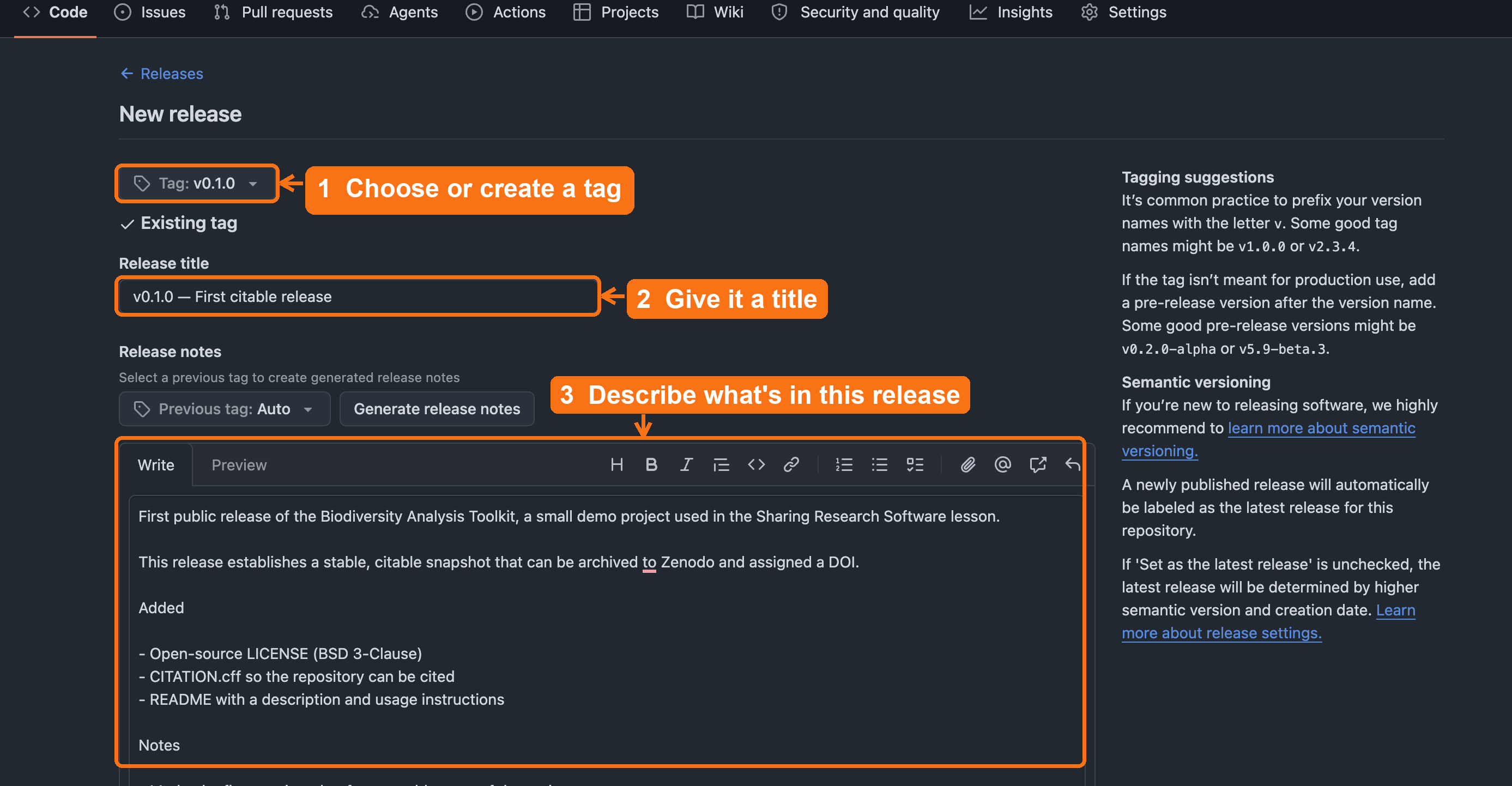
v0.1.0, add a release title,
describe what’s in the release, then click Publish
release (below the fold).Step 4: Zenodo auto-archives and mints DOI
- Zenodo automatically detects your new release
- Creates an archived snapshot
- Assigns a permanent DOI
- Wait a few minutes for processing
Step 5: Add DOI badge to your README
- Copy the DOI badge from your Zenodo record
- Add it to the top of your README:
MARKDOWN
[](https://doi.org/10.5281/zenodo.123456)Step 6: Update your CFF file with your DOI
- Add the DOI to your
CITATION.cff:
Result: You now have LICENSE, CITATION.cff, and DOI.
What the DOI actually archived
Zenodo archived the repository as it existed the moment you
clicked Publish release. That snapshot is fixed. The
CITATION.cff edit you just made in Step 6, and any later
README or metadata changes, update the live GitHub repository and will
be captured by your next release, not the one already archived.
If you want the archived snapshot itself to contain the DOI, make a new
release after updating the file.
If Zenodo can’t see your repository
Zenodo only lists repositories you have admin rights on. For an
organization repo, an org owner may need to approve Zenodo’s access
first; for this exercise, forking under your personal account avoids the
problem entirely. (Keep the sandbox rule in mind too: a
10.5072/... sandbox DOI is for practice, never for a paper
or a real CITATION.cff.)
With the release published and the DOI minted, the citable-software chain is complete. Here is how the pieces you have added map onto FAIR:
Now You Have Everything
- ✅ F - Findable: Added DOI, CITATION.cff, rich metadata
- ✅ A - Accessible: Public GitHub, archived on Zenodo
- ✅ I - Interoperable: Standard formats (YAML, CFF)
- ✅ R - Reusable: LICENSE (BSD-3), README with setup
Check your work
Compare your fork against the 04-create-release
reference branch on the demo
repository. It shows the target state after this episode: a tagged
release and a CITATION.cff updated with the DOI.
With the DOI minted, one practical question remains, and it is the one researchers will bring straight to you: which DOI do they actually cite?
Supporting others: which DOI do I cite?
Zenodo mints two DOIs for every project, and the distinction is worth knowing cold. Librarians already have it: it is the work versus the edition, “cite the exact edition you quoted” versus “refer to the work as a whole.”
- Version DOI points to one exact release. Cite this when the precise software state matters for reproducibility, such as the version that produced a paper’s results.
- Concept DOI points to the project across all versions and always resolves to the latest. Cite this when you want to refer to the software in general.
A safe default to teach: cite the version DOI in a
methods section, and use the concept DOI in a README or
project page. And if a repository ever has both a
CITATION.cff and a .zenodo.json, remember that
Zenodo uses the .zenodo.json for the archived release
metadata.
Whichever DOI you cite, durability is the whole point: even if GitHub disappears, your DOI still works. The GitHub-Zenodo link works like a deposit, so each release is archived at CERN, independent of GitHub’s fate. The workshop can burn down; the deposited copy survives.
Zenodo archives a snapshot of your code at release time. Software Heritage goes further: it continuously crawls GitHub, GitLab, and other forges and archives everything, assigning a SWHID (Software Heritage Identifier) to every file, directory, commit, and release.
A SWHID looks like this:
swh:1:rel:22ece559cc7cc2364edc5e5593d63ae8bd229f9fIt points to an exact, immutable snapshot that survives forge closures (Gitorious shut down in 2015; Google Code in 2016, both making thousands of repos unreachable). Your Zenodo DOI is the right identifier for citation; a SWHID is the long-term preservation record.
To find and record your SWHID:
- Go to https://archive.softwareheritage.org/
- Paste your GitHub repository URL into the search box
- If your repo is already archived, copy the SWHID for your release
- If it hasn’t been crawled yet, click Save code now to trigger immediate archival
- Once archived, add the SWHID to your
CITATION.cff:
This approach is recommended in the 2026 CODE Beyond FAIR roadmap (Di Cosmo et al., Scientific Data).
The FORCE11 Software Citation Working Group produced practical checklists and a deeper look at implementation challenges, useful if you’re setting up citation practices for a whole lab or department rather than one repository:
- Chue Hong, N. P., Allen, A., Gonzalez-Beltran, A., et al. (2019). Software Citation Checklist for Authors (0.9.0). Zenodo. https://doi.org/10.5281/zenodo.3479199
- Chue Hong, N. P., Allen, A., Gonzalez-Beltran, A., et al. (2019). Software Citation Checklist for Developers. Zenodo. https://doi.org/10.5281/zenodo.3479198
- Katz, D. S., Bouquin, D., Chue Hong, N. P., et al. (2019). Software citation implementation challenges. arXiv. https://doi.org/10.48550/arXiv.1905.08674
Challenge 2: Why are versioned DOIs important?
Why might it matter that a DOI points to a specific release rather than the whole project?
Versioned DOIs:
- support reproducibility by identifying an exact snapshot
- prevent confusion when the software changes
- allow users to cite precisely the version they used
- support FAIR4RS and publisher guidelines
- Software is citable as soon as it includes a citation file and a
stable version.
- GitHub releases create versioned snapshots for citation.
- DOIs are optional but strengthen discoverability, persistence, and
reproducibility.
- Zenodo can automatically mint a DOI for each GitHub release.