
Choosing an Open-Source License
Last updated on 2026-09-22 | Edit this page
Estimated time: 30 minutes
Overview
Questions
- Why do you need a license for your code?
- How can an open-source license increase reuse and citation?
- What licenses does the UC system recommend?
Objectives
- Explain why unlicensed software is not legally reusable
- Describe the main categories of open-source licenses
- Choose an appropriate license for a UC research project or using UC resources
- Add a license file to a GitHub repository
- Supporting others: decide when a licensing question is yours to answer and when to refer it to Tech Transfer / IP
Disclaimer
This workshop is not meant to provide legal advice or replace consulting with an attorney. The information contained herein is provided for informational purposes only, and should not be construed as legal advice on any subject matter. The contents of this episode contains general information and may not reflect current legal developments or address your situation. If you require legal advice, please consult with your attorney. No attorney-client relationship is created between you and the authors/presenter of this episode or University of California.
Why licensing matters
Here is the counterintuitive fact this episode turns on: code posted publicly on GitHub with no license is not open. Copyright attaches automatically, so “no license” means “all rights reserved,” and anyone who reuses that code is technically infringing. The visible repo is an invitation nobody can legally accept. A license file is one small text file, usually chosen from a short approved list, and it is the difference between “look but don’t touch” and actually reusable.
Clear licensing tells others what they can and cannot do with your code, which is the minimum needed for open, reproducible research.
Why this episode matters to researchers: licensing is where reuse and credit actually begin. An unlicensed repo cannot be legally built on, which means it will not accumulate the users, forks, and citations that make software count as a scholarly contribution. This is also the one episode with a hard referral boundary: you can explain categories and point to the campus default, but ownership questions go to Tech Transfer. Knowing where that line sits is itself the expertise.
Institutional Context: Who Owns Your Software?
At most universities, software created using institutional resources or created as part of research is owned by the institution, not the individual researcher. Before releasing code under an open-source license, check with your Technology Transfer or Intellectual Property office. They will verify ownership, funding requirements, and any third-party restrictions.
If you are at a UC campus: software is typically owned by The Regents of the University of California. The UC Copyright policy can be found at ____https://copyright.universityofcalifornia.edu or google UC Copyright. The policy governs copyright ownership. Prior to release contact your campus Tech Transfer office to verify ownership, funding requirements, and any third-party restrictions.
The TTO or UC OSPO Network can help you select from the UC-approved license list provided the TTO can cleared your code for release. The chart can be found at: https://security.ucop.edu/files/documents/resources/oss-chart.pdf. (UC-specific)
The UC OSPO License Guide covers UC institutional requirements.
At other institutions: check with your research computing, library, or legal office. Most will have a similar process and a list of preferred licenses.
Challenge: True or False
- [Myth or Fact] If you post your code publicly on the internet, it automatically becomes Open Source.
- [Myth or Fact] An open source license is essentially a legal “permission slip” from the creator.
- [Myth or Fact] An open source license means I am giving away my ownership of the code.
- [Myth or Fact] If you post your code publicly on the internet, it automatically becomes Open Source. FALSE/MYTH
- [Myth or Fact] An open source license is essentially a legal “permission slip” from the creator. TRUE/FACT
- [Myth or Fact] An open source license means I am giving away my ownership of the code. FALSE/MYTH
Understanding license categories
Open-source licenses fall into two broad groups; within those groups, there is some gradation. Once you understand licenses choosing a license becomes easier.
The two categories are: * Permissive licenses * Copyleft licenses
Permissive licenses
- Easy to comply with
- These allow broad reuse with minimal restrictions.
- Anyone can freely copy, modify, or redistribute the code.
- They are common in research because they’re simple and maximize flexibility.
- Think of them as roughly a CC BY for code: “reuse this, just keep my name on it.”
Examples: BSD and MIT
Note: There are different flavors of BSD:
- 2-Clause and 3-Clause
- 3-Clause includes a clause that explicitly states no endorsement or use of the licensor’s name. It is recommended by UC
BSD licenses are a common first choice at many research institutions because they:
- originated at UC Berkeley
- are simple to understand
- protect both the institution and authors
- integrate well with most other licenses
- have minimal restrictions
Special case: Apache and BSD + Patent
Both are considered Permissive licenses; BUT they contain explicit patent grants.
The UC and many corporations are wary about patent grants as these patents grants can inadvertently reach into their patent portfolio and cover a patent from another campus or lab/research team.
For this reach releasing code under the Apache and BSD + Patent is disfavored.
Copyleft licenses
Copyleft are also known as viral or reciprocal licenses. The UC OSS Chart uses the term hereditary.
These require that derivative works also remain open source. This is accomplished by requiring that derivative works must be licensed under the same copyleft license as the original work.
This protects openness across the lifecycle of a project.
What is a derivative can be ambiguous and legal question.
Strong copyleft (like GPL and AGPL) define derivative works broadly, so linking can create a derivative work
Weak copyleft (like LGPL, MPL, EPL) usually:
** provide an exception that allows certain combinations with your work and the original work without triggering the copyleft provision; or ** limit derivative works to modifications to files of the original work.
Version 3 of GPL, AGPL, LGPL
The UC system does not recommend version 3.0 of GPL, AGPL, and LGPL for university-owned software due to patent provisions that may conflict with UC policies. If you need copyleft protection, consult your campus Tech Transfer office about GPL 2.0 or alternatives.
How to choose a license
The decision guide below and the license references in this episode center UC policy and the UC OSPO guidance. For a non-UC workshop, swap in your own institution’s license guidance and name the local office that answers ownership questions (usually a technology transfer or research office) in place of the UC pointers.
Timebox the license discussion. The teaching target is not license philosophy; it is recognizing no-license risk, choosing a low-risk default for the demo, and knowing when to refer ownership or policy questions to Tech Transfer or the local equivalent. If the room starts debating MIT vs BSD, name the campus default and move on.
Five “low-risk” licenses are suitable for most research projects. Here’s a decision guide:
graph TD
    accTitle: License decision flowchart
    accDescr {
        Decision tree for choosing an open source license, starting from whether the project has special requirements, branching to BSD 3-Clause, MIT, Apache 2.0, ECL 2.0, or GPL depending on the need, and ending with a check with the campus Tech Transfer Office.
    }
    Start[Starting a new UC research software project?] --> Check{Do you have<br/>special requirements?}

    Check -->|No special needs| BSD[Use BSD 3-Clause<br/>✓ Common research default<br/>✓ Simple and protective<br/>✓ Widely compatible]

    Check -->|Need simpler text| MIT[Use MIT License<br/>✓ Nearly identical to BSD<br/>✓ Shorter, easier to read<br/>✓ Very popular]

    Check -->|Industry partnership<br/>or patent concerns| Apache[Use Apache 2.0<br/>✓ Explicit patent protection<br/>✓ Detailed contribution terms<br/>✓ Industry-friendly]

    Check -->|Educational focus| ECL[Consider ECL 2.0<br/>✓ Education-specific variant<br/>✓ Based on Apache 2.0]

    BSD --> TTO[Verify with campus<br/>Tech Transfer Office]
    MIT --> TTO
    Apache --> TTO
    ECL --> TTO

    Check -->|Need copyleft| Copyleft{GPL version?}
    Copyleft -->|GPL 2.0| GPL2[May be acceptable<br/>Consult Tech Transfer]
    Copyleft -->|GPL 3.0| GPL3[❌ Not recommended by UC<br/>Patent conflicts]

    GPL2 --> TTO
    GPL3 --> TTO

    style Start fill:#f5f5f5,stroke:#333,color:#000
    style Check fill:#f5f5f5,stroke:#333,color:#000
    style Copyleft fill:#f5f5f5,stroke:#333,color:#000
    style BSD fill:#90EE90,stroke:#333,color:#000
    style MIT fill:#90EE90,stroke:#333,color:#000
    style Apache fill:#90EE90,stroke:#333,color:#000
    style ECL fill:#90EE90,stroke:#333,color:#000
    style GPL2 fill:#FFFF99,stroke:#333,color:#000
    style GPL3 fill:#FFB6C6,stroke:#333,color:#000
    style TTO fill:#87CEEB,stroke:#333,color:#000
Quick reference
| Your need | Recommended license | SPDX identifier | Why |
|---|---|---|---|
| Default / most projects | BSD 3-Clause | BSD-3-Clause |
Common default at research institutions |
| Simplest possible | MIT | MIT |
Minimal text, very popular |
| Educational focus | —- | —– | Education-specific variant |
The SPDX identifier is the short, machine-readable
code used by GitHub, Zenodo, and your CITATION.cff file to
communicate your license automatically. When GitHub shows a license
badge in the sidebar, it’s reading the SPDX identifier.
Always consult your institution’s Tech Transfer or IP office before releasing software created with institutional resources, part of your research, grant funding, multiple institutions, industry partner
Software licenses (BSD, MIT, Apache) are written for executable code. If your repository also contains datasets, figures, or documentation, those files need a separate license.
The standard choice for research outputs is Creative Commons Attribution 4.0 (CC BY 4.0), which allows broad reuse with attribution.
A common pattern:
-
/srcor your code files →BSD-3-ClauseorMIT -
/dataor/docs→CC-BY-4.0
You can note this split in your README and in
CITATION.cff under the license field, which
accepts a list:
Most research repositories don’t need this, but if you’re sharing a dataset alongside code, it’s worth thinking through.
Resources
- ChooseALicense.com – Compare features across all common licenses.
- SPDX License List – Authoritative registry of license identifiers used in CITATION.cff and package metadata.
- UC OSPO License Guide (UC-specific) – UC institutional requirements and templates.
- UC OSS Chart and Companion Guide (UC-specific) – UC-approved “low-risk” license list. https://security.ucop.edu/files/documents/resources/oss-chart.pdf
Supporting others
Licensing is the step where advising and deciding must stay
separate. You can explain the categories, point to the campus default,
and walk someone through adding a LICENSE file. You are not
the office that determines who owns the code.
Refer rather than answer when:
- Ownership is unclear (institutional resources, grant funding, multiple institutions, industry partners). This goes to Tech Transfer / IP, not the service desk.
- The repo pulls in third-party code or data with its
own license terms that might conflict. This is VERY IMPORTANT. Package
managers, docker containers, build tools can add libraries or other code
to your code. You need to ensure that this additional code does not have
a conflicting license. No copyleft in permissively licensed product. No
unlicensed code. No Apache in version 2 of GPL variants.
- Someone wants to relicense or remove a license on code that already has contributors.
What you can own confidently: knowing your campus default (BSD-3-Clause at UC), knowing the approved-license list exists, and making sure the ownership question gets asked before code goes public. The most useful thing you do here is often a warm handoff, not a recommendation.
When the filename is LICENSE, GitHub should offer a
license template chooser (“Choose a license template”). If learners do
not see it, check the filename, that they are creating the file in the
repository root, and a browser refresh before troubleshooting anything
more complex.
Challenge: Add a BSD License to Your Repository
We will add the BSD 3-Clause license to your demo repository:
- Navigate to your repository on GitHub.
- Click Add file → Create new file.
- Name it exactly
LICENSE(no file extension). - Click Choose a license template and select BSD 3-Clause License.
- Update the copyright holder to reflect who owns the software. At UC
campuses this is
The Regents of the University of California; at other institutions check with your Tech Transfer office. (If this is a personal project, use your own name.) - Update the year to 2026.
- Commit the file to your
mainbranch.
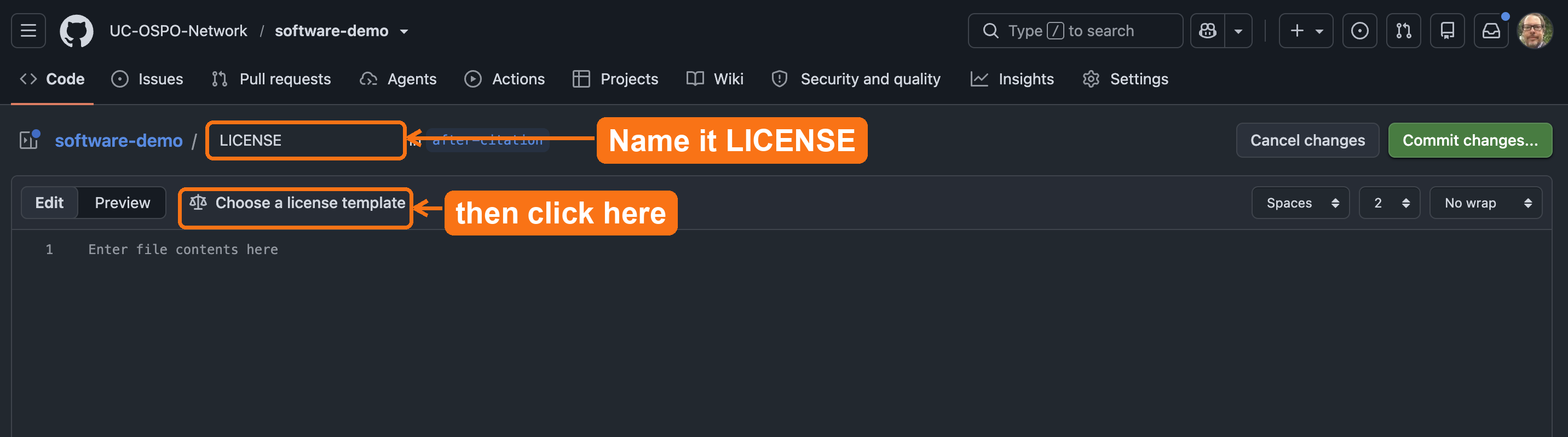
LICENSE, then
click Choose a license template to insert the full BSD
3-Clause text.Verify: Does your repository now display the “BSD-3-Clause” license badge in the sidebar?
GitHub automatically detects the LICENSE file and
displays it in the sidebar. Your file should look like this:
BSD 3-Clause License

Copyright (c) 2026, The Regents of the University of California
All rights reserved.
If the badge doesn’t appear, ensure the file is in the root directory
and named exactly LICENSE.
Check your work
Compare your fork against the 02-add-license
reference branch on the demo
repository. It shows the target state after this episode: a
LICENSE file in the root and the BSD-3-Clause badge in the
sidebar.
Communicating your license
After adding a LICENSE file, reference it in your README so users immediately understand usage terms.
Add this section near the top of your README:
MARKDOWN
## License

This project is licensed under the BSD 3-Clause License - see the [LICENSE](LICENSE) file for details.
Why this matters: Users reading your README on platforms other than GitHub (Zenodo, email, exported PDFs) will see your license terms even without GitHub’s automatic detection.
Exercise: License Scenarios
Which license would you recommend for each UC research scenario?
Scenario 1: A Python package for ecological data analysis. You want maximum adoption across academia and industry.
Scenario 2: A data visualization tool that you only want other researchers to use.
Scenario 3: A simple utility script you’re sharing with collaborators.
Scenario 1: BSD 3-Clause (UC’s default recommendation, maximum flexibility and adoption)
Scenario 2: Talk to TTO or OSPO Network to find a public source license with restrictions permitting only non-commercial/educational/research use.
Scenario 3: Either BSD 3-Clause or MIT (both work well for simple sharing; BSD preferred by UC)
In all cases, verify with your campus Tech Transfer office before releasing.
Summary
Licensing is foundational to making research software usable, citable, and shareable. In this episode, you added a BSD license to a repository following UC recommendations.
- Without a license, software is legally restricted and not reusable
- BSD 3-Clause is a common default at research institutions; MIT is a strong alternatives
- Permissive licenses (BSD, MIT) maximize flexibility and adoption
- Always consult your institution’s Tech Transfer or IP office before releasing institutionally-owned software
- GitHub makes adding standard licenses straightforward